Capture with CRD
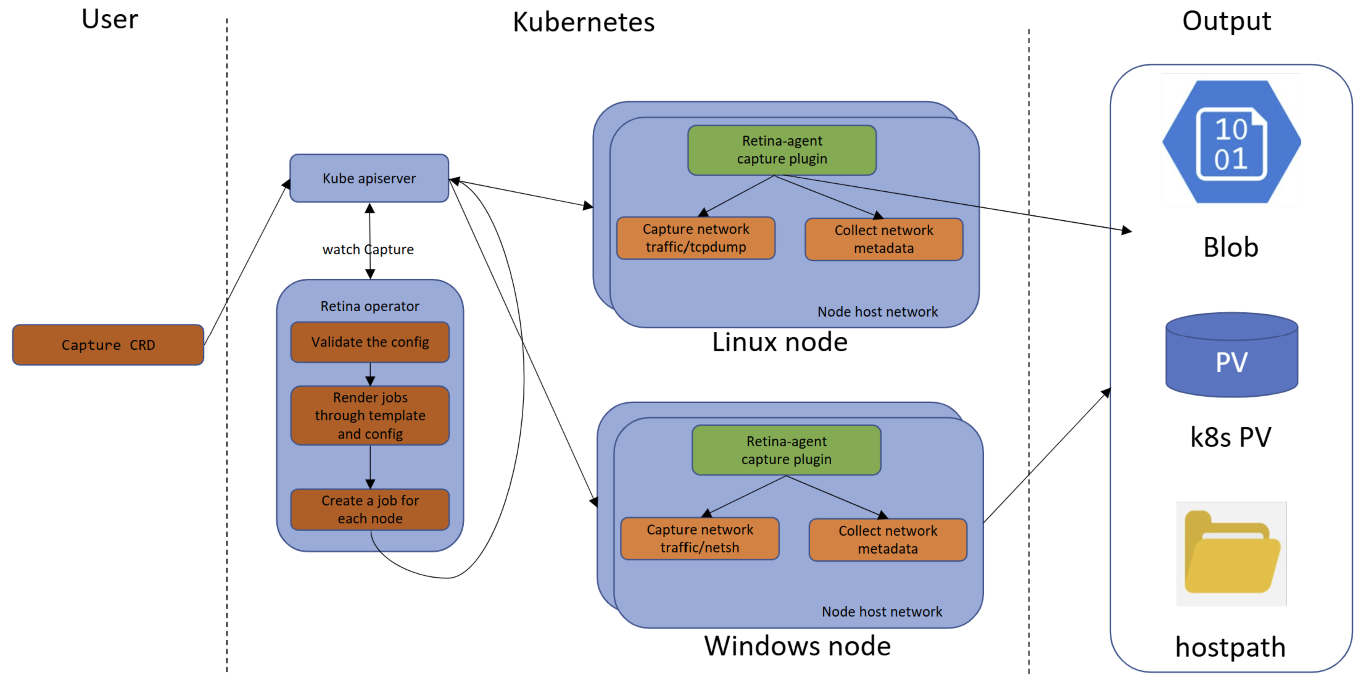
This page describes how the Retina Capture CRD works.
See the overview for a description of how the capture jobs are created.
Prerequisites
- Install Retina with capture support.
- Sufficient node storage for capture files when using the default host-path output, unless a remote output location (blob, S3, or PVC) is configured instead.
Cluster Access
Unlike the CLI, the CRD flow doesn't require your own user/context to hold Job/Secret/Pod permissions — the Retina operator's ServiceAccount (granted via its Helm chart ClusterRole) creates and manages the underlying Jobs, Secrets, and Pods on your behalf. You only need permission to manage the CRD itself in the target namespace:
| Resource | Verbs | Scope |
|---|---|---|
captures.retina.sh | create, get, list, delete | namespace |
Cluster Admission Policies
The operator translates each Capture into the same underlying Job/Pod spec used by the CLI, so the same elevated Pod settings are required. If the cluster enforces restrictive admission policies (e.g. Azure Policy, Gatekeeper, Kyverno), the capture namespace/workload must be allowed to use:
- Host network (
hostNetwork: true) - required so the capture pod can see the node's network interfaces. - Host IPC (
hostIPC: true) - required by the underlying capture tooling. NET_ADMINandSYS_ADMINLinux capabilities - required to run the packet capture on the host's interfaces.- The capture image's registry - the default capture image is pulled from
ghcr.io/microsoft/retina/retina-agent. If the cluster restricts pulls to an approved registry, allow-list this image/registry or mirror it into your approved registry.
If your cluster denies any of these, the capture Job's pod will fail admission — check kubectl get capture <capture-crd-name> -o yaml for job status, and the pod events in the target namespace for the denial reason.
Usage
You must create a YAML manifest file with the desired specifications and apply it to the cluster using kubectl apply.
- If successful, the capture job should spin up after you apply.
- If not successful, no job will spin up. You can troubleshoot by checking the status of the CRD with
kubectl get capture <capture-crd-name> -o yaml.
The full specification for the Capture CRD can be found in the Capture CRD file.
Refer to the Capture CRD page for more details.
# Install Retina with Standard Control Plane and Operator enabled
> VERSION=$( curl -sL https://api.github.com/repos/microsoft/retina/releases/latest | jq -r .name)
helm upgrade --install retina oci://ghcr.io/microsoft/retina/charts/retina \
    --version $VERSION \
    --namespace kube-system \
    --set image.tag=$VERSION \
    --set operator.tag=$VERSION \
    --set logLevel=info \
    --set operator.enabled=true \
    --set enabledPlugin_linux="\[dropreason\,packetforward\,linuxutil\,dns\]"

Release "retina" does not exist. Installing it now.
Pulled: ghcr.io/microsoft/retina/charts/retina:v0.0.33
Digest: sha256:0d647b8c5090725684ad9bd0c9c988eccd4ee3cbf06a08a7270f362236057bd0
NAME: retina
LAST DEPLOYED: Fri May 30 09:01:57 2025
NAMESPACE: kube-system
STATUS: deployed
REVISION: 1
NOTES:
1. Installing retina service using helm: helm install retina ./deploy/standard/manifests/controller/helm/retina/ --namespace kube-system --dependency-update
2. Cleaning up/uninstalling/deleting retina and dependencies related:
  helm uninstall retina -n kube-system

# Apply the Capture configuration
> kubectl apply -f capture.yaml
capture.retina.sh/hubble-cp-capture created

# View the jobs which got created
> kubectl get jobs
NAME                        STATUS     COMPLETIONS   DURATION   AGE
standard-cp-capture-8r8sf   Complete   1/1           11s        4m31s
standard-cp-capture-sdtd7   Complete   1/1           11s        4m31s
Examples
Node Selectors and Host Path output target
apiVersion: retina.sh/v1alpha1
kind: Capture
metadata:
  name: example-node-selectors
spec:
  captureConfiguration:
    captureOption:
      duration: "5s"
      maxCaptureSize: 100
      packetSize: 1500
    captureTarget:
      nodeSelector:
        matchLabels:
          kubernetes.io/os: linux
  outputConfiguration:
    hostPath: example-capture
Include / Exclude filters
apiVersion: retina.sh/v1alpha1
kind: Capture
metadata:
  name: example-include-exclude-filters
spec:
  captureConfiguration:
    captureOption:
      duration: "5s"
      maxCaptureSize: 100
      packetSize: 1500
    captureTarget:
      nodeSelector:
        matchLabels:
          kubernetes.io/os: linux
    filters:
      include:
        - 10.224.0.42:80
        - 10.224.0.33:8080
      exclude:
        - 10.224.0.26:80
        - 10.224.0.34:8080
  outputConfiguration:
    hostPath: example-capture
Source / Destination IP filters
apiVersion: retina.sh/v1alpha1
kind: Capture
metadata:
  name: example-source-destination-ip
spec:
  captureConfiguration:
    captureOption:
      duration: "5s"
      maxCaptureSize: 100
      sourceIPs:
        - 10.224.0.42
      destinationIPs:
        - 10.224.0.33
        - 10.224.0.34
    captureTarget:
      nodeSelector:
        matchLabels:
          kubernetes.io/os: linux
  outputConfiguration:
    hostPath: example-capture
This captures only packets whose source IP is 10.224.0.42 and whose destination IP is either 10.224.0.33 or 10.224.0.34. sourceIPs and destinationIPs can each be used on their own, and work on both Linux and Windows nodes.
Single Pod by Name
apiVersion: retina.sh/v1alpha1
kind: Capture
metadata:
  name: example-pod-names
  namespace: myapp
spec:
  captureConfiguration:
    captureOption:
      duration: "60s"
      maxCaptureSize: 100
    captureTarget:
      podNames:
        - my-app-pod-abc123
  outputConfiguration:
    hostPath: example-capture
Multiple Pods by Name
apiVersion: retina.sh/v1alpha1
kind: Capture
metadata:
  name: example-multiple-pod-names
  namespace: myapp
spec:
  captureConfiguration:
    captureOption:
      duration: "30s"
      maxCaptureSize: 100
    captureTarget:
      podNames:
        - my-app-pod-abc123
        - my-app-pod-def456
  outputConfiguration:
    hostPath: example-capture
Rotating Capture (Long-Running)
Use fileCount with maxCaptureSize to create a rotating buffer of capture files. This is useful for debugging intermittent issues — the capture runs continuously, retaining only the most recent traffic.
apiVersion: retina.sh/v1alpha1
kind: Capture
metadata:
  name: example-rotating-capture
spec:
  captureConfiguration:
    captureOption:
      # Per-file size limit in MB
      maxCaptureSize: 100
      # Number of rotating files (oldest overwritten when limit reached)
      # Total buffer: 100MB × 10 = 1GB of recent traffic
      fileCount: 10
    captureTarget:
      nodeSelector:
        matchLabels:
          kubernetes.io/os: linux
  outputConfiguration:
    hostPath: /mnt/retina/captures
To stop the rotating capture once the issue is reproduced:
kubectl delete capture example-rotating-capture
Additional examples can also be found in the GitHub capture samples.
Automatic Cleanup After Upload
Set cleanUpAfterUpload: true in the Capture spec to have the controller automatically delete the Capture resource and all associated jobs once all capture jobs complete successfully and data has been uploaded to remote storage (Blob, S3, or PVC).
apiVersion: retina.sh/v1alpha1
kind: Capture
metadata:
  name: my-capture
spec:
  captureConfiguration:
    captureTarget:
      nodeSelector:
        matchLabels:
          kubernetes.io/os: linux
  outputConfiguration:
    blobUpload: "<secret-name>"
  cleanUpAfterUpload: true
If any job fails, the Capture resource and jobs are preserved for debugging. This option requires a remote storage output (blobUpload, s3Upload, or persistentVolumeClaim).